
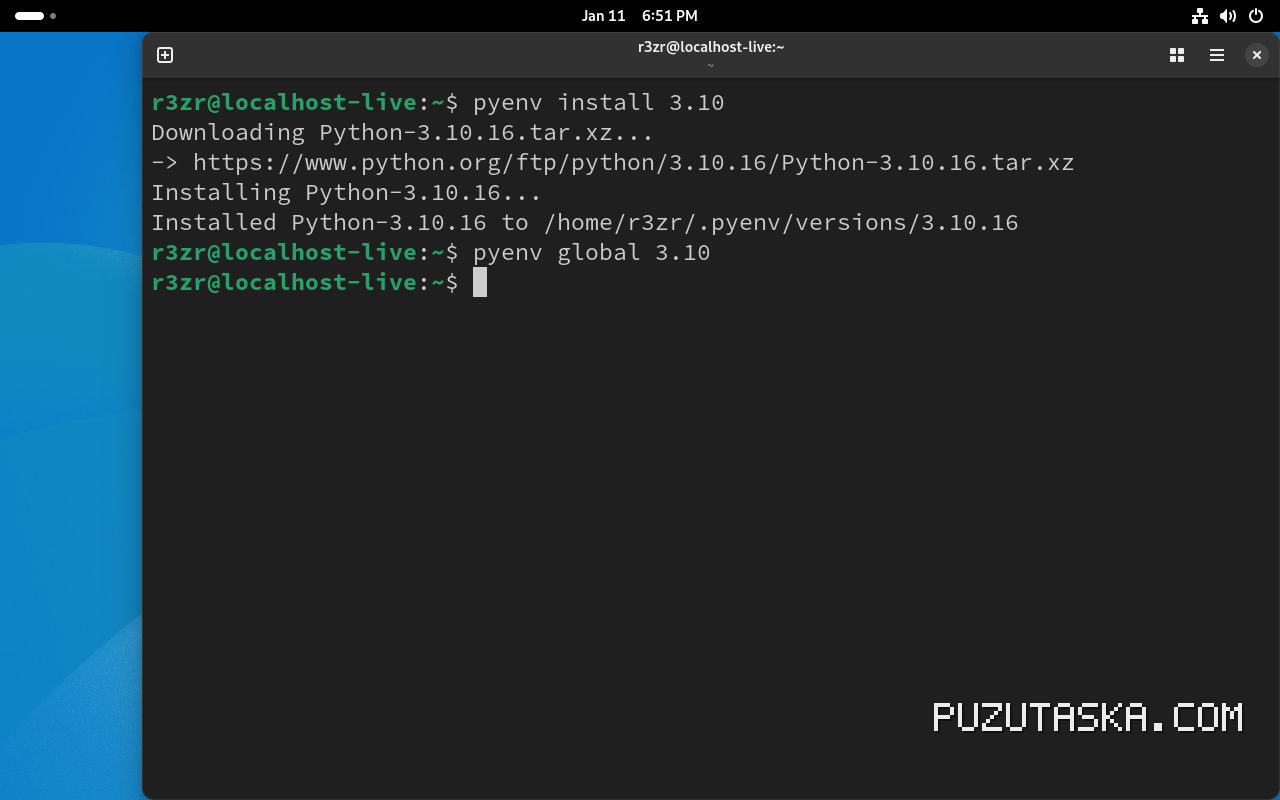
pyenv install is the workhorse command for Python version management. It downloads, compiles, and installs a specific Python version, like `pyenv install 3.12.0`. This tool, forked from rbenv and created by Yamashita Yuu around 2012, has become essential for developers juggling multiple Python environments. You may also want to check Debby Clarke Belichick Obituary: Life, Legacy, and Family for a different perspective on similar ground
Practical Steps to Install Python Versions Today
Before running pyenv install, check your system’s build dependencies. On Ubuntu, that means `libssl-dev`, `libreadline-dev`, and `zlib1g-dev`. Missing these leads to cryptic errors like “No module named _ssl” after compilation. A reference profile of the subject is maintained on GitHub – pyenv/pyenv-installer: This tool is used to install `pyenv …
List available versions with `pyenv install -l`. This shows hundreds of CPython releases, from 2.7 to 3.13.0, plus PyPy and Anaconda. Choose one, then run `pyenv install 3.13.0`. The command compiles from source, which takes several minutes on older hardware. On a related note, Improve Software Meetshaxs: What the Search Term Actually Means adds helpful background
Useful flags speed up the workflow. `-s` skips installation if the version already exists. `-v` gives verbose output during compilation, helpful for debugging. `-f` forces a reinstall, overwriting the existing version.
For custom builds, `pyenv install –patch` applies a patch file before compiling. You can also point to a local source tarball or URL, though the default downloads from Mirrors are configurable via the `PYTHON_BUILD_MIRROR` environment variable.
Essential Tools and Resources for pyenv Users
The pyenv ecosystem relies on the python-build plugin, which handles the heavy lifting of downloading and compiling. This plugin is bundled with pyenv, so no separate installation is needed.
Community support thrives on GitHub, where the pyenv/pyenv repository is actively maintained. Recent releases include 2.x versions in 2024-2025, ensuring compatibility with the latest Python releases. The official installer script, available at the pyenv-installer repository, simplifies setup on macOS and Linux.
Pair pyenv with pyenv-virtualenv to create isolated environments after installation. This combination lets you test code against multiple Python versions without polluting your system Python. Many practitioners also use `pyenv local` to set a directory-specific version, which is ideal for project-based workflows. com/pyenv/pyenv-installer” rel=”noopener noreferrer” target=”_blank”>GitHub – pyenv/pyenv-installer: This tool is used to install `pyenv…
For troubleshooting, the pyenv wiki documents common build issues and their fixes. The community is responsive, and most problems stem from missing system libraries or outdated pyenv versions.
What Is Confirmed and What Remains Unverified
pyenv/versions`.
13.0, released October 2024, is installable via pyenv install in current versions. The pyenv team added support shortly after the CPython release.
Unverified: Some claims suggest pyenv install can build from a local source tree without network access. While the `–patch` option exists, the exact behavior depends on the source layout. The official docs are vague on this, so treat it as experimental.
Disputed: Whether pyenv install is faster than using system package managers. Some developers argue that compiling from source is slower but offers more control. Others prefer `apt` or `brew` for speed. The truth is that pyenv’s compilation is reliable but not optimized for speed.
Critical Analysis: Strengths and Weaknesses
pyenv install excels at flexibility. It lets you install multiple Python versions side-by-side, switch between them instantly, and even test pre-release versions. This is a boon for library maintainers who must ensure compatibility across Python 3.8 to 3.13.
However, the compilation process is a double-edged sword. It requires build tools like gcc and make, which are not present on minimal systems. On Windows, pyenv is not natively supported; users must rely on WSL or third-party ports. This limits its appeal for some developers.
The weaker claim here is that pyenv install is “easy” for beginners. The learning curve is steep: understanding environment variables, build dependencies, and shell integration takes time. The more useful approach is to start with a single version and gradually explore advanced features.
Another strength is the active community. The pyenv project has evolved significantly since its 2012 inception, with regular updates and a responsive issue tracker. This ensures that new Python releases are supported quickly, as seen with 3.13.0.
Frequently Asked Questions
Is it safe to use pyenv install on a production server?
Generally, yes, but caution is advised. pyenv install compiles from source, which can introduce build-time vulnerabilities if dependencies are outdated. Always update your system packages first. For critical production environments, consider using official Docker images or system packages instead.
What is a good alternative to pyenv install?
For Python version management, alternatives include `pythonz`, `asdf`, and `uv`. `asdf` supports multiple languages, while `uv` is a fast Rust-based tool. Each has its own strengths; pyenv remains popular for its simplicity and maturity.
How does pyenv install differ from using a system package manager?
System package managers like `apt` or `brew` install pre-compiled binaries, which are faster but limited to the versions they package. pyenv install compiles from source, offering more versions and customization, but requires build tools and takes longer.
What is pyenv install best known for?
It is best known for enabling developers to install and switch between multiple Python versions effortlessly. This is crucial for testing code across different Python releases and for projects that require specific versions.
What impact has pyenv install had on Python development?
It has simplified version management, reducing the friction of maintaining multiple Python environments. This has encouraged more developers to test against multiple versions, improving overall code quality and compatibility.
